RedContact

Make urgent and important calls quickly and easily. Have a set of selected personal contacts and emergency numbers ready to dial. Give Red Contact to your elder family members and be sure that they will be able to contact you in case of need. Available on iPhone and Apple Watch.

Download on the App Store

The calls that matter, one tap away

Primary contacts

Pick the people you'd want to reach first, straight from your address book.

  • Add contacts in a couple of taps — reorder or remove them any time.
  • See them in a scrollable list of large, easy-to-read rows.
  • Or give each contact a full-screen page of their own, and swipe to move between them.
Primary contacts list on iPhone Edit mode page on iPhone for selecting and reoordering contact

Call or send a message

From the main screen, a single tap places the call or sends the message.

  • Tap anywhere on a contact's row to call — or flip one switch to send messages instead.
  • On a contact's full-screen page, the red button calls and the green button texts.
  • Messages include your current location — with a map — by default.
Full-screen contact page on iPhone

Emergency services

Police, fire, ambulance — and any other service you may need to reach.

  • Start from built-in defaults by country, so the numbers are right for where you are.
  • Add, edit, reorder or remove services to match your needs.
  • Tap the red circle on a service's row to dial it.
Emergency services list on iPhone

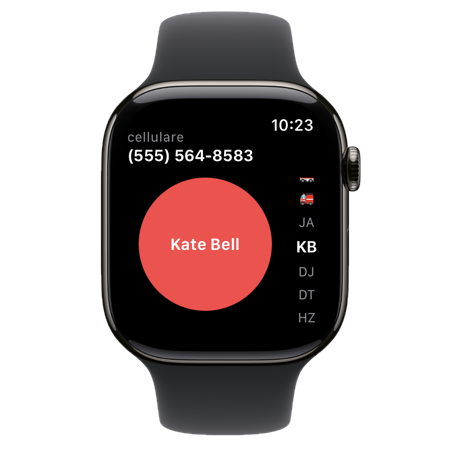
On your wrist

Your contacts and services follow you to Apple Watch.

  • Turn the Digital Crown to pick a contact or service, then tap the red button to dial.
  • Everything syncs automatically from your iPhone — nothing to set up.
RedContact on Apple Watch

Get RedContact

Available on iPhone, with a companion app for Apple Watch.

Download on the App Store

Contact

Questions or feedback about RedContact? Drop us a line.